Physicians Cancer Chemotherapy
AtmosphereAppsMedical
4.78.00 Reviews
- Version
- 2.3.1.156
- Installs
- 10.00K
- Age Rating
- Everyone
Screenshots
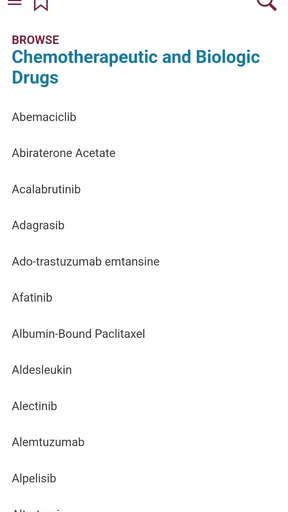
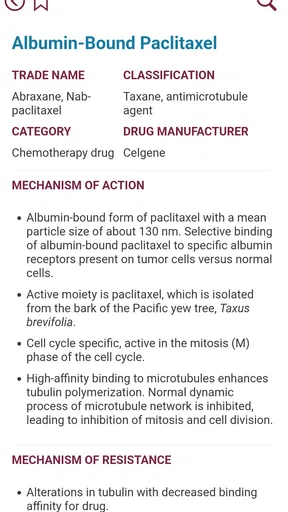
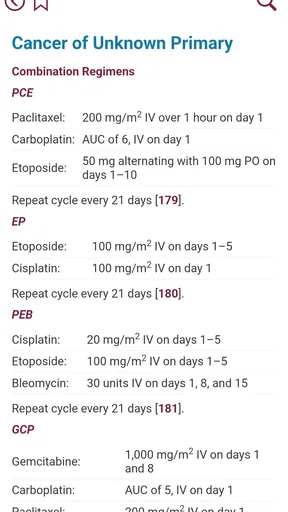
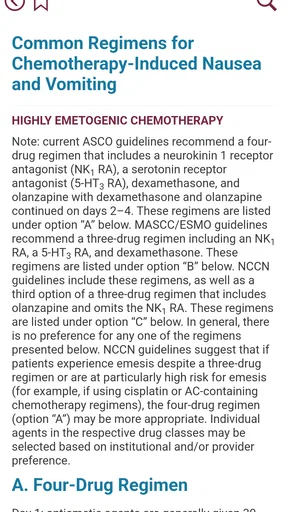
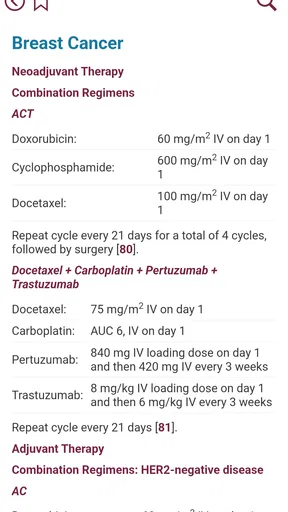
Our Review of Physicians Cancer Chemotherapy
 Analysis by Appyee
When I first opened Physicians Cancer Chemotherapy, I understood its appeal immediately: it is a focused medical reference rather than a general health app. Its purpose is to help users consult treatment information connected with major cancers, and that narrow purpose makes it more useful in a professional or study setting than a broad symptom checker. I would describe it as a compact drug guide for people who already understand that cancer treatment decisions require clinical judgment.
The app comes from AtmosphereApps and is listed in the Medical category. It is free to install, carries an Everyone age rating, and has reached over ten thousand installs. Those details make it easy to try without a financial commitment at the starting point, although the presence of in-app purchases priced at $39.99 per item is important to keep in mind before treating the free download as a completely unrestricted reference.
My overall impression is cautiously positive. The app can save time when I need a concentrated place to review oncology drug information, but I would never use it as a substitute for a cancer specialist, pharmacist, institutional protocol, or current prescribing reference. That distinction is not a minor disclaimer. In oncology, the right answer can depend on diagnosis, stage, biomarkers, previous treatment, organ function, interactions, and local practice. A useful app still has to be used inside that larger context.
How the reference feels in everyday use
The strongest part of the experience is its subject focus. Instead of asking me to sort through a large collection of unrelated health topics, the app stays centered on chemotherapy and cancer treatment information. That can make a difference when I am studying a treatment class, preparing questions for an appointment, or trying to understand a medicine that has already been mentioned by a clinician.
A realistic example would be a family member leaving an oncology consultation with several unfamiliar drug names written in a notebook. I could use the app as a first pass to recognize what those medicines are generally associated with, then write down more precise questions for the next conversation. I would not use that quick lookup to decide whether a dose is safe or whether a treatment should be delayed. The value is in improving orientation, not replacing the consultation.
Its current version is 2.3.1.156, and the app was released on May 23, 2018. That history gives the product some staying power, but it also makes me pay attention to how I interpret “latest” treatment information. A medical reference needs ongoing maintenance, and an app’s age alone cannot prove that every entry reflects current guidelines. I would check the date and source context of important information whenever the decision could affect care.
The published average rating is 4.7 from around 155 ratings, with 8 written reviews. That is encouraging as a sign that many people have found the app useful, but I would not treat the rating as evidence of clinical completeness. Ratings usually reflect convenience and personal experience, while the questions that matter most here involve accuracy, update practices, scope, and suitability for a particular patient.
Who will get the most from it
I think the best audience includes medical students, healthcare workers who need a quick orientation tool, caregivers trying to understand terminology, and patients who want to prepare for a more productive discussion with their care team. It may also help someone organize a personal list of medicines before speaking with a pharmacist, especially when the names are difficult to remember.
The app is less suitable for someone looking for a diagnosis, a personalized treatment plan, or reassurance about symptoms. It is also not the right choice for urgent side effects. If a person is experiencing breathing difficulty, severe allergic symptoms, confusion, uncontrolled vomiting, unusual bleeding, or another potentially serious reaction, searching a reference app is the wrong next step. The appropriate response is to contact the treating team or emergency services according to the situation.
I would also hesitate to recommend it as the only reference for a professional making a real prescribing decision. A specialist may need full monographs, interaction checking, laboratory requirements, dose adjustments, administration protocols, and institution-specific guidance. A compact app can sit beside those resources, but it should not replace them.
Three practical ways to use it well
My first practical tip is to use the app before an appointment, not during a stressful treatment decision. I would look up unfamiliar terms, note which points remain unclear, and bring those questions to the oncologist or pharmacist. This turns the app into a preparation tool rather than an authority that I expect to settle a complex case.
My second tip is to separate general drug knowledge from patient-specific instructions. A medicine can be used in several cancers or treatment combinations, while a particular patient may receive a different schedule because of laboratory results, previous therapies, kidney or liver function, or other health conditions. I would keep those two layers separate in my notes and never copy a general description into a personal medication plan.
My third tip is to compare any high-stakes information with the care team’s written instructions. If the app appears to describe a different use, schedule, or warning, I would not assume that one source is automatically wrong. I would ask the clinician or pharmacist to explain the difference. That small habit is especially valuable in oncology, where treatment protocols can vary according to disease details and local standards.
A fourth useful habit is to treat the app as a question generator. Rather than searching only for “what does this drug do,” I would ask: What is this medicine being used for in my situation? Which side effects should prompt a call? Are there food, supplement, or medication interactions? What monitoring is expected? The app may help me understand the vocabulary, while the clinical team supplies the patient-specific answer.
Trust, privacy, and visible user control
When I review a medical app, I look for more than its topic. I also want to know what the app visibly asks me to do, whether it requires an account, what information I am expected to enter, and whether important choices are clear. With this product, I would make those checks directly on the device before using it for sensitive situations. I would not assume that a medical subject automatically means the app collects medical records, and I would not assume the opposite either.
That leads to a simple rule: I would avoid entering identifying patient details unless the app clearly requires them and explains why. A drug reference normally works best with generic questions, medicine names, and general learning goals. There is rarely a good reason to type a full name, hospital number, address, or detailed diagnosis into a reference tool when a general lookup will do.
I would also review the app’s visible permission requests during installation and later in the operating system settings. If a permission seems unrelated to looking up cancer medicines, I would pause and decide whether the benefit justifies granting it. The same applies to notifications, account creation, and any purchase screen. I prefer medical tools that let me make those choices deliberately rather than pushing me through them quickly.
The free price makes initial testing straightforward, but the in-app purchase price of $39.99 per item creates a meaningful decision point. Before buying anything, I would identify exactly what the purchase unlocks, whether it is needed for my intended use, and whether the payment is one-time or recurring. I would also check the purchase confirmation carefully. A free installation should not be confused with unlimited access to every part of the reference.
For a student, that price may be reasonable only if the unlocked material fits a sustained study need and can be evaluated beforehand. For a patient who needs a few explanations, a pharmacist or hospital education resource may offer better value. For a professional, the comparison should include the reliability and depth of established clinical references, not just the convenience of a phone-based lookup.
Moments when caution matters most
The most sensitive moment is when a reader finds information that appears to conflict with a treatment plan. I would stop there rather than trying to reconcile the difference alone. Cancer medicines are often used in combinations, and the same drug can appear in different contexts. A short entry may be accurate in general while still being incomplete for one patient.
Another sensitive moment is side-effect research. Reading about possible reactions can be helpful, but long medical lists can also create unnecessary fear. I would use the app to identify terms I do not understand, then rely on the oncology team’s instructions for severity, timing, and action. I would pay close attention to the difference between an expected effect that can be monitored and a warning sign that needs urgent help.
Drug interactions are another area where I would avoid overconfidence. Prescription medicines, over-the-counter products, vitamins, and herbal supplements can all matter. If the app mentions a potential interaction, I would show the complete medication list to a pharmacist. If it does not mention one, I would not interpret that silence as proof that no interaction exists.
There is also a practical risk in relying on an app while offline or in a rushed setting: I may remember a brief phrase but miss the qualification around it. For important information, I would read the surrounding entry carefully, record the question, and confirm it with a qualified professional. The app is most helpful when it slows down confusion, not when it encourages quick self-treatment.
How it compares with familiar alternatives
Compared with a general web search, this app has the advantage of a narrower subject area. Search engines often return a mixture of hospital pages, commercial content, discussion boards, and outdated material. A focused cancer drug reference can reduce that initial clutter and make it easier to stay on topic.
Compared with a hospital’s patient portal, however, it serves a different purpose. A portal may contain the patient’s actual appointments, instructions, test results, and messages from the care team. This app should be viewed as general reference material, not as a channel for personalized care. If the question is “What should I do tonight?” the care team’s instructions are more relevant than a general drug entry.
Compared with a professional clinical database, the trade-off is likely to be convenience versus depth. A specialist reference may provide more extensive prescribing detail, interaction tools, evidence context, and update information. The app can be easier to open for a quick orientation, but I would choose the more comprehensive resource when making or checking a clinical decision.
Compared with printed patient leaflets, the app may feel more searchable and less cumbersome when several medicines are involved. Printed material still has an important advantage: it is often supplied directly for the exact medicine and treatment plan. I would keep those official instructions and use the app alongside them, rather than discarding them in favor of a general guide.
What I would check before relying on it
Before making it part of my routine, I would open several entries related to medicines I already recognize and see whether the explanations are clear enough for the intended audience. I would look for terminology that is explained rather than merely listed, and I would note whether the app makes it easy to distinguish a medicine’s general use from a patient-specific recommendation.
I would also test the app with a low-stakes question first. For example, I might look up a drug name purely to understand its broad role before using it to prepare for a consultation. This gives me a sense of navigation and readability without placing an urgent decision on an unfamiliar tool.
If I were considering an in-app purchase, I would make that choice only after confirming the unlocked content’s relevance. I would not pay simply because a medical topic feels important. The purchase should solve a clear problem, such as supporting a defined study workflow, and the app should remain one part of a broader set of trustworthy resources.
For families, I would recommend agreeing on one person who keeps the questions organized. That prevents several relatives from searching separately, misunderstanding different passages, and giving the patient conflicting interpretations. A shared written list reviewed by the care team is more useful than a collection of screenshots taken without context.
My cautious verdict
Physicians Cancer Chemotherapy is a sensible specialist reference for learning the language around cancer medicines and preparing better questions. I like its focused medical purpose, free entry point, and potential usefulness as a quick companion to professional care. The strong average rating and growing install base suggest that it has found an audience, although those signals should not be confused with a clinical guarantee.
My recommendation comes with firm boundaries. I would use it for orientation, study, and appointment preparation. I would not use it to diagnose cancer, alter a treatment schedule, interpret an emergency, or replace a pharmacist’s interaction check. I would also inspect permissions, account requirements, privacy choices, and purchase details on my own device before entering anything sensitive or paying for additional content.
For a medical student or caregiver who wants a concentrated cancer-drug reference, it is worth trying. For a patient seeking personalized answers, an official care channel is the better first stop. The app earns its place when I treat it as a supporting reference rather than the final word. That cautious approach is what makes its strengths useful while limiting the risks that come with applying general medical information to one person’s treatment.
In short, I would keep it available as a convenient learning aid, but I would always pair it with current instructions from qualified professionals. Its best contribution is helping me arrive at the right conversation better prepared; its weakest use is asking it to make that conversation unnecessary.
Verdict
Strengths of Physicians Cancer Chemotherapy
- Provides quick access to chemotherapy drug information.
- Useful reference for checking common cancer treatment medicines.
- Simple layout makes entries easy to browse.
- May help students review oncology pharmacology basics.
- Works as a handy supplementary tool during study or clinical preparation.
Limitations of Physicians Cancer Chemotherapy
- It is not a substitute for an oncologist’s treatment advice.
- Drug information may require verification against current guidelines.
- Coverage may not include every cancer medicine or regimen.
- Limited context about patient-specific dosing and contraindications.
- The interface may feel basic compared with comprehensive medical databases.
Other Releases by AtmosphereApps
View All


Similar Picks in This Category
View All
WebMD: Symptom Checker
WebMD, LLC4.1

Microphone Amplifier
DOSA Apps4.2

Anatomy Learning - 3D Anatomy
3D Medical OU4.5

Period Tracker and Calendar
SimpleInnovation4.9

GoodRx: Prescription Coupons
GoodRx4.8

CVS Health
CVS Pharmacy4.5
Frequently Asked Questions
What is Physicians Cancer Chemotherapy designed for?
Physicians Cancer Chemotherapy is intended as a clinical reference tool for healthcare professionals involved in oncology care. It may provide information about chemotherapy medicines, treatment regimens, dosing considerations, supportive medications, and cancer-related protocols. It should be used to support professional decision-making, not as a replacement for institutional guidelines, current medical literature, specialist consultation, or the prescribing information approved in your country.
Can patients use this app to choose or adjust chemotherapy treatment?
Patients may find the app useful for understanding medical terminology or preparing questions for an oncology appointment, but it is not designed for self-diagnosis or self-treatment. Chemotherapy selection and dosing depend on factors such as cancer type, stage, laboratory results, organ function, previous therapies, and overall health. Never start, stop, or change cancer medication based only on information displayed in the app.
Is the information in Physicians Cancer Chemotherapy accurate and up to date?
The app can be a convenient reference, but medical content may change as new research, approvals, safety warnings, and treatment guidelines become available. Before relying on any regimen, dose, interaction warning, or contraindication, users should confirm the information against official drug labeling, recognized oncology guidelines, and their local hospital protocol. The app should complement—not replace—professional verification.
Does the app include chemotherapy doses, side effects, or drug interactions?
Depending on the version and available content, Physicians Cancer Chemotherapy may include practical details such as drug names, regimen information, administration guidance, adverse effects, precautions, and interaction considerations. Coverage can vary by medicine and region, so users should read each entry carefully and check the date of the latest update. Dosing must always be individualized by a qualified oncology professional.
Is Physicians Cancer Chemotherapy free, and does it require internet access?
Availability, pricing, advertising, and offline functionality may differ between the Android and iOS versions and can also change after updates. Check the relevant app store listing before downloading to confirm whether the app contains purchases, subscriptions, or restricted professional content. Some features may work offline after installation, while updates, external references, or certain databases may require an internet connection.
